

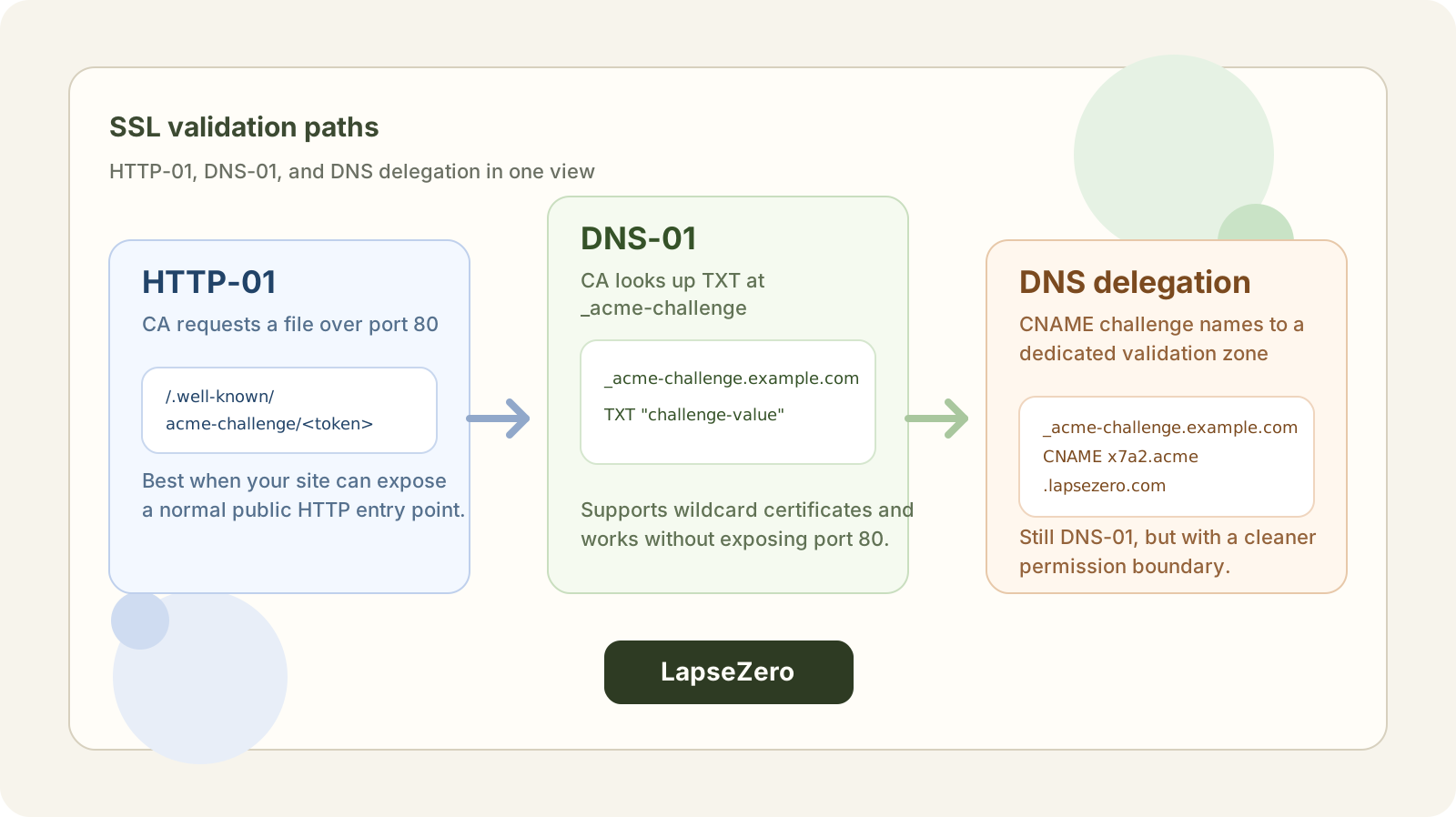
First-timers applying for an SSL certificate almost always get stuck at this step — picking a validation method. The UI shows HTTP-01, DNS-01, and sometimes DNS delegation. Three options, no explanation. Which one do you click?
What Does "Validation" Actually Mean?
Applying for an SSL certificate is essentially telling an organization called a CA (Certificate Authority): "This domain is mine — please issue me a certificate."
But the CA doesn't know you. It needs you to prove that you actually control the domain. Validation is how that works: the CA gives you a challenge to complete, and once you complete it, the CA trusts that you own the domain.
HTTP-01 and DNS-01 are two different types of challenges. DNS delegation is more of a helper strategy built on top of DNS-01. Let's go through each one.
HTTP-01: Drop a File on Your Web Server
How It Works
The CA says: "Put a file with specific content at http://your-domain/.well-known/acme-challenge/, and I'll go fetch it. If I get the right response, you're verified."
You put the file in place, the CA makes an HTTP request to that URL, gets the expected content, and the certificate gets issued.
Pros
- Straightforward — as long as you control the web root, just drop a file
- No DNS changes needed, no DNS access required
Limitations
- Your server must be publicly accessible on the internet, and the CA always connects on port 80
- No wildcard certificates (e.g.
*.example.com) — every hostname has to be validated with its own file - Can be unreliable in restricted networks: validation requests come from the CA's servers, and firewalls, geo-blocking, or unusual routing can block them and cause validation to fail
Who It's For
Websites hosted on a public-facing server, where you don't need a wildcard cert and don't have access to manage DNS.
DNS-01: Add a TXT Record to Your DNS
How It Works
The CA says: "Add a TXT record to your domain with this specific value, and I'll look it up in DNS. If it's there, you're verified."
You go into your DNS management panel (Cloudflare, Route 53, GoDaddy, etc.) and add:
_acme-challenge.your-domain. TXT "the-random-value-from-CA"
The CA queries DNS, finds the record, and validation passes. To confirm the record is visible before the CA checks, look it up on several public resolvers at once with the DNS & CAA Checker.
Pros
- Your server doesn't need to be publicly accessible — works for internal/private servers
- Supports wildcard certificates — something HTTP-01 can't do
- Generally more reliable — DNS propagation is more predictable than HTTP requests across varied network environments
Limitations
- You need access to manage DNS for the domain
Who It's For
Anyone who needs a wildcard certificate, runs servers on a private network, or doesn't want to expose port 80.
Side by Side
| HTTP-01 | DNS-01 | |
|---|---|---|
| Where you act | Drop a file on your server | Add a TXT record in DNS |
| Server needs public internet | Yes | No |
| Wildcard certificate support | ❌ | ✅ |
| Network sensitivity | Higher — firewalls, geo-blocking, and redirects can interfere | Lower — DNS lookups are generally stable |
| Setup complexity | Simple on one server; tricky with multiple servers, a CDN, or forced redirects | One record by hand; auto-renewal needs a DNS provider API |
DNS Delegation: Taking DNS-01 Further
Now that we've covered both validation methods, let's talk about DNS delegation — this is not a third validation method. It's an enhancement built on top of DNS-01.
DNS-01 itself isn't complicated, but if you want automatic renewal, your tooling needs to be able to write a new TXT record every time the certificate renews — which means it needs API access to your DNS provider.
That's where two real-world problems come up.
-
Not every DNS provider has an API. A lot of domains are hosted with smaller or older providers that simply don't offer one. That means every renewal requires manually logging into the DNS panel and updating the record — on every renewal — roughly every 60 days for today's 90-day certificates, and more often as lifetimes shrink. Easy to forget, easy to mess up.
-
Even if your provider has an API, the access scope is too broad. Your main domain's DNS controls everything — all your subdomains, mail records, the works. Handing that API key to a cert tool means the tool could theoretically modify any record on your domain. If the key leaks or the tool misbehaves, the entire domain's DNS is at risk.
DNS delegation exists to solve both problems at once.
How DNS Delegation Solves This
DNS-01 validation always looks up this name:
_acme-challenge.example.com
In your main domain's DNS, you add a CNAME pointing that name to a separate, purpose-built DNS zone — one with tightly scoped permissions:
_acme-challenge.example.com. CNAME f3a9c1d2.acme-validation.example.net.
From that point on, all ACME TXT records get written to that dedicated zone. When the CA queries _acme-challenge.example.com, it follows the CNAME and finds the right TXT record. Validation passes.
Why This Is Better
- Your main DNS only needs the CNAME records added once — never touched again, no matter how many times the certificate renews
- The API key your cert tool holds is scoped only to that small dedicated zone — it can't touch any other record on your main domain
- It doesn't matter what provider hosts your main DNS, or whether it has an API at all — the validation side runs on its own API-capable service independently
One caveat: delegation narrows DNS write access, not certificate issuance risk. Whoever controls the validation zone can pass validation and get certificates for your domain, so its credentials still need to be protected.
A practical example: LapseZero supports DNS delegation — configure it once and it handles automatic renewals without ever needing access to your main DNS again.
Who It's For
- You want automatic renewal but your main DNS provider doesn't offer an API
- Your provider has an API, but you don't want to hand over full DNS access to a cert tool
- You're managing renewals across multiple domains and want a unified, lower-risk setup
So Which One Should You Use?
These aren't mutually exclusive — pick based on your situation:
- Need a wildcard certificate → Must use DNS-01 or DNS delegation
- Have DNS access → DNS-01 is simpler and more reliable
- Want auto-renewal, but your main DNS has no API or you don't want to hand over full DNS access → DNS delegation, with the CNAME records added once
- No DNS access → HTTP-01 is your only option, but watch out for network issues and server configuration gotchas
Once you understand what's actually happening under the hood, the choice stops being confusing.
If you're still deciding whether a certificate is worth paying for, see our post on free vs. paid SSL certificates, which covers how they differ in validation, trust, and support.