

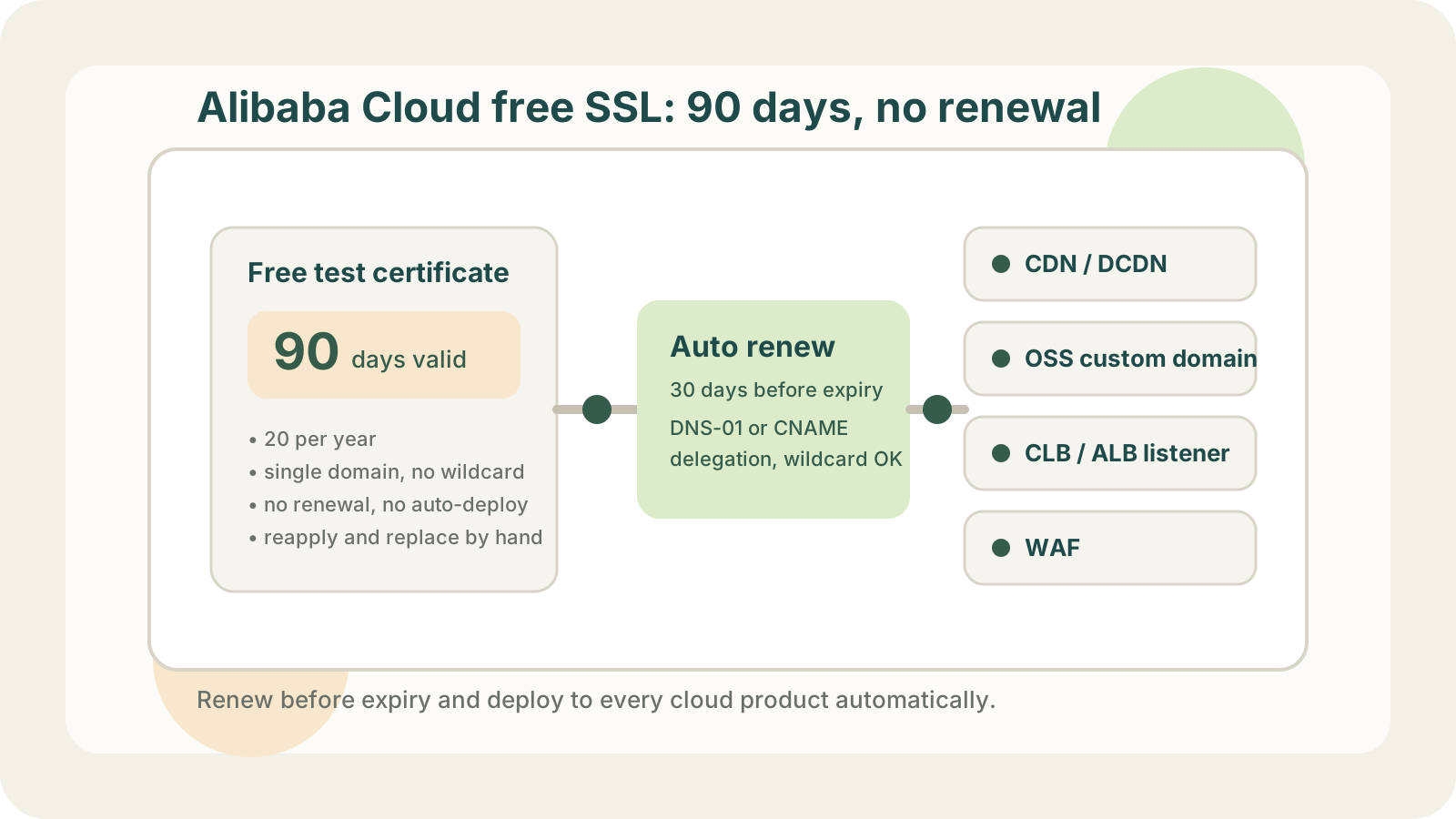
The Current Rules for Alibaba Cloud Free Certificates
The free certificate in Alibaba Cloud's Certificate Management Service is now called the "personal test certificate (free edition)". According to the official documentation on the China site (aliyun.com), it comes with these limits:
- 90-day validity, roughly 3 months.
- 20 certificates per verified identity per calendar year. Revoking one does not return the quota.
- Single domain only. No wildcards and no multi-domain certificates.
- No renewal. When it expires, you apply for a brand-new certificate.
- No managed deployment. Alibaba Cloud's certificate hosting and automatic deployment only apply to paid certificates.
The rules above come from the Alibaba Cloud China site (aliyun.com). The international site (alibabacloud.com) may differ, so check the certificate console in your own account.
The free certificates you could once enable directly in the CDN or DCDN console used to renew themselves. That path is closed too: DCDN stopped auto-renewing free certificates on April 15, 2023, and the official advice is to apply for a new certificate in the SSL service and configure it on the domain by hand.
So using an Alibaba Cloud free certificate today means repeating the full apply, validate, and deploy cycle every 3 months.
Why a 3-Month Cycle Hurts
With one domain on one CDN, swapping the certificate by hand every 3 months is tolerable. The real problem is scale.
The quota runs out. At 90 days per certificate, and replacing it a little early, you go through 4 to 5 certificates per domain per year. Five subdomains already need more than 20 a year, which exhausts the annual quota. And because wildcards are not supported, www, api, static, and img each take their own certificate.
Deployments are scattered. The certificate for one domain rarely lives in just one place:
- An accelerated domain on CDN or DCDN.
- A custom domain bound to an OSS bucket.
- An HTTPS listener on a CLB or ALB load balancer.
- A protected domain on WAF.
Every replacement means updating each of these one by one. Miss one and you end up half-expired: the CDN has the new certificate while the origin load balancer still serves the old one.
It all depends on someone remembering. Expiry reminders arrive by email and SMS, but acting on them still depends on one person being available that week, remembering every deployment location, and uploading the right certificate to the right place. A team change or a holiday is enough for something to slip.
The Manual Replacement Flow
If you still need to do it by hand for now, this is the standard flow in the Alibaba Cloud console. Following it in order avoids most mistakes.
1. Apply for a new certificate
Go to Certificate Management Service → SSL Certificate Management → Personal Test Certificates, create a new certificate, and enter the domain. This uses one certificate from your annual quota.
2. Complete domain validation
If the domain is hosted on Alibaba Cloud DNS, choose automatic DNS validation and the validation record is added for you. If DNS is hosted elsewhere, add the TXT record shown in the console and wait for the CA to see it before the certificate can be issued. If validation keeps failing, check whether the record is live with the DNS & CAA Checker.
3. Deploy to cloud products
Once issued, click Deploy in the certificate list and choose the cloud products and resources, such as a CDN domain, an OSS custom domain, or a CLB listener. You can select several resources at once.
4. Check that each one is live
A successful deployment task does not mean the change is live. Visit each domain afterward and confirm the browser receives the new certificate with an expiry date 90 days out. You can also check them one by one with the SSL certificate expiry checker.
CDN certificate updates take time to reach every edge node, and DNS validation can also be slow. Start replacing 2 to 4 weeks before expiry so there is room to retry if something fails.
Ways to Stop Replacing Certificates by Hand
| Option | Pros | Cost |
|---|---|---|
| Manual free certificates | No cost | Every 3 months, 20 per year, relies on memory |
| Paid cert + hosting | Official automatic deployment | Every certificate is paid; wildcards cost more |
| Your own scripts | Free, no quota | You own the OpenAPI calls, retries, alerts |
| Automation platform | Free, wildcard, auto-deploy | Grant access to DNS and cloud products |
"Your own scripts" usually means issuing with acme.sh or certbot and then calling the Alibaba Cloud OpenAPI to upload and bind the certificate. An "automation platform" turns that whole chain into a ready-made service, such as LapseZero.
Free certificates from public CAs such as Let's Encrypt, ZeroSSL, and Google Trust Services are DV certificates just like Alibaba Cloud's free ones, with the same browser trust. They have no 20-per-year cap and they support wildcards, so one *.example.com covers every subdomain. The only missing piece is deploying them to Alibaba Cloud automatically after issuance.
Paid Certificates Won't Save You Either
You might think: just buy a paid certificate and replace it less often. That option is shrinking too, and since this year you can no longer buy a one-year certificate.
The CA/Browser Forum passed ballot SC-081, which shortens the maximum validity of publicly trusted SSL certificates in stages:
- From March 15, 2026: 200 days.
- From March 15, 2027: 100 days.
- From March 15, 2029: 47 days.
Paid certificates now last about six months at most. From 2027 they will need replacing roughly every 3 months, as often as today's free certificates, and by 2029 about once a month. Certificate replacement will have to be automated eventually; the only question is whether you do it now or later.
Auto-Renew and Deploy to Alibaba Cloud with LapseZero
LapseZero chains issuance, renewal, and deployment to cloud products into one workflow. Set it up once and stop thinking about it.
1. Add the domain and choose a validation method.
- DNS on Alibaba Cloud DNS: add an AccessKey for a RAM user with DNS permissions only, and the platform writes the validation records for you.
- Don't want to hand over DNS access: choose DNS delegation. Add the CNAME records to your zone, and all future validation happens in the platform's own validation zone. See HTTP-01 vs DNS-01 vs DNS delegation for how the two compare.
2. Issue the certificate. Free CAs such as Let's Encrypt are used, wildcards are supported, and none of your Alibaba Cloud free certificate quota is consumed.
3. Add deployment targets. Supported today: Alibaba Cloud CDN, DCDN, OSS custom domains, HTTPS listeners on CLB / ALB, and WAF, plus your own servers over SSH. When you add a target, the platform lists the resources in your account that match the domain, and you just select them. Use a RAM user for cloud credentials and grant it only the permissions for those products.
4. Renewal and deployment run on their own. By default the certificate renews 30 days before expiry and is deployed to every target once issued. Each target's result is recorded separately, so you can see which target failed and at which step. Issues that need your attention are sent through email, Slack, Telegram, webhooks, and other channels.
The free plan includes 3 domains and 5 deployment targets, which is enough for most personal sites and small teams.