

Let's Encrypt Certificates Should Not Depend on Memory
A 90-day Let's Encrypt SSL/TLS certificate already needs discipline. Calendar reminders, spreadsheets, or a message in an operations channel can carry a team through a 90-day cadence. They will not hold up as lifetimes shrink.
Let's Encrypt has announced a staged move toward shorter lifetimes: the default profile moves to 64 days on February 10, 2027, and to 45 days on February 16, 2028. Short lifetimes are not a bad thing — they reduce the damage window when a certificate or private key is compromised. They do force every team to fully automate certificate management. Any script that blindly renews every 60 days is too late for a 45-day certificate. Let's Encrypt makes the same point in its certificate lifetime announcement: if your ACME client does not support ARI, make sure the renewal schedule actually works for 45-day certificates.
Let's Encrypt still issues 90-day certificates by default. Since May 2026, early adopters can opt in to 45-day certificates; the default moves to 64 days in February 2027 and 45 days in February 2028. That leaves time to fix the automation path before it becomes urgent.
The harder part is what happens after issuance:
- The certificate renewed, but Nginx was never reloaded.
- One server has the new certificate, while another server still serves the old one.
- The CDN edge certificate is fine, but the origin certificate is close to expiry.
- A wildcard certificate uses DNS-01, and the DNS token, propagation delay, or TXT cleanup breaks renewal.
- The certificate file changed on disk, but the public endpoint still returns the old certificate.
certbot renew only covers the renewal step. In production, you still need repeatable validation, distribution to the right targets, service reloads or binding changes, and proof that the public endpoint is serving the new certificate.
certbot renew Is Only Part of the Job
Many setups start with something like this:
certbot renew --dry-run
certbot renew
systemctl reload nginx
For one machine running one Nginx, that can be enough — Certbot ships with a systemd timer or cron job for automated renewal, and a hook handles the reload.
The problem is that most production certificates do not serve only one machine. A single example.com certificate may live on multiple Nginx servers, a load balancer listener, a CDN, Kubernetes Ingress, and an internal API gateway. At that point certbot renew only updates the local files. Distribution, import, binding changes, reloads, and live endpoint checks are all still on you.
Half-automation is the easiest setup to overtrust. The certificate may renew automatically but still wait for someone to copy it to another machine. A deployment script may return success while the public endpoint keeps serving the old certificate. That state is harder to catch than a fully manual process because the team believes the renewal path is already closed.
Renewal, Deployment, and Checks Need One Chain
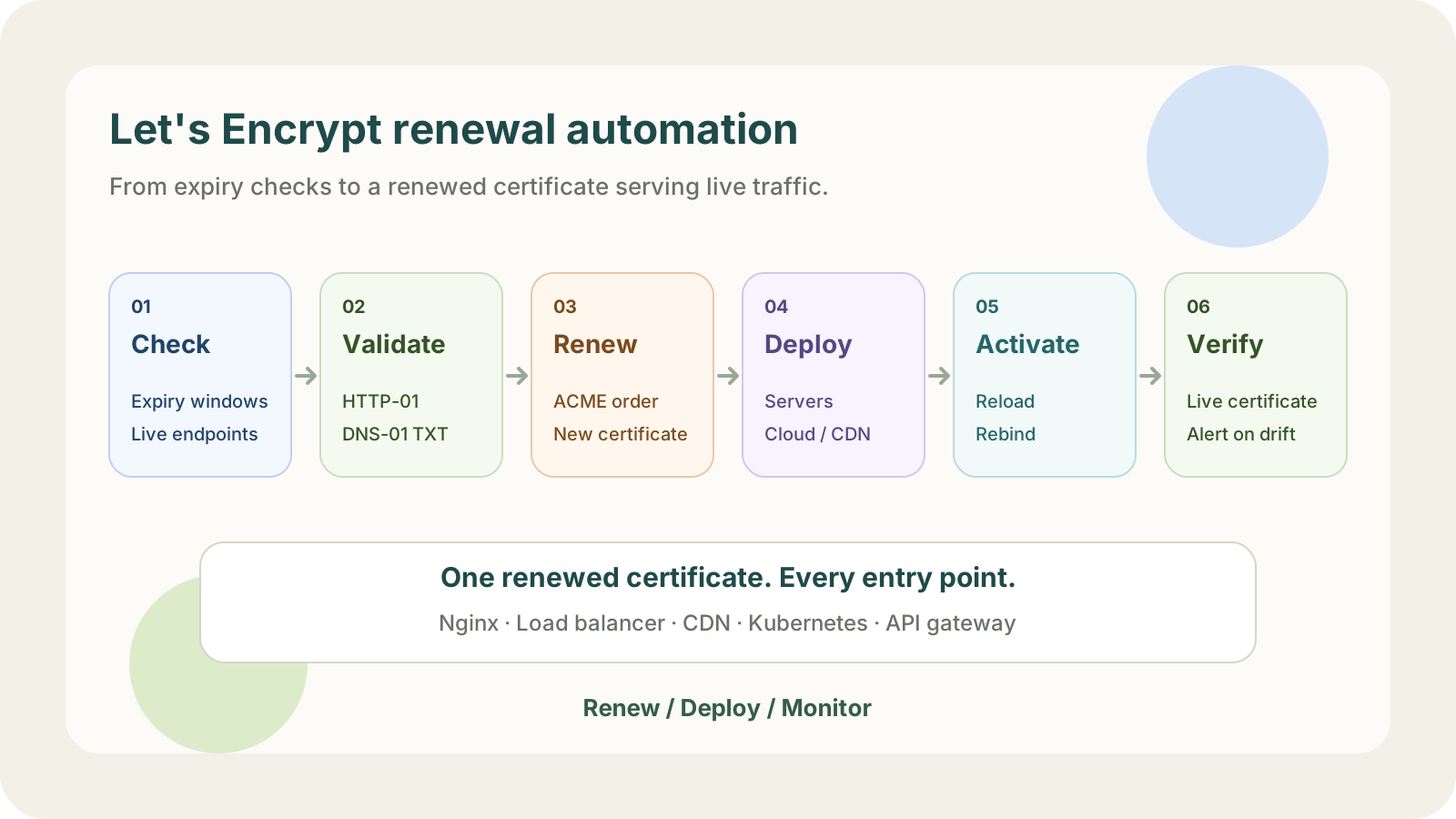
For Let's Encrypt renewal to be reliable, six things have to work.
| Step | Question it needs to answer |
|---|---|
| Check | Which certificates are close to expiry? What certificate is the live endpoint serving? |
| Validate | Can HTTP-01 or DNS-01 still complete? |
| Renew | Is the ACME client renewing at the right time? |
| Deploy | Which servers, cloud products, CDNs, or gateways need the new certificate? |
| Activate | Did Nginx reload? Did the cloud resource switch to the new certificate? |
| Alert | Which step failed, and who needs to act? |
Miss one step and the site can still go down. The most subtle one is "Activate": the files on disk are new, but the running process still holds the old certificate in memory. If you only ls the file path, everything looks fine. Users still see the old cert.
One Nginx Server: Let Certbot Do Its Thing
If you have one server, one Nginx instance, and one website, Certbot's automatic renewal plus a reload hook usually closes the loop. Adding another system at that point just adds something to operate.
Still, check the basics.
Is the scheduled renewal actually there?
On a systemd-based system, check timers:
systemctl list-timers | grep certbot
If your setup uses cron, inspect the system crontab or the relevant user crontab. Do not rely on "I think Certbot set that up when I installed it." Find the scheduled task.
Does dry-run still pass?
After you change certificate settings, DNS settings, reverse proxy rules, or web entry points, run a test renewal:
certbot renew --dry-run
This catches problems like a blocked HTTP-01 path, a DNS-01 token without permission, or an outdated plugin setting before the real renewal window.
Does renewal reload the service?
Certbot supports hooks. A common deploy hook is to reload Nginx after a successful renewal:
certbot renew --deploy-hook "systemctl reload nginx"
You can also put scripts under Certbot's renewal hook directories. The exact location is less important than the guarantee: when the certificate really changes, the service that uses it must reload or rebind.
certbot renew --dry-run does not save the test certificate as your
production certificate. Certbot has --run-deploy-hooks, but when used with
dry-run, the hook runs against the current active certificate, not the
temporary test certificate. That detail matters when you test reload logic.
Wildcards: DNS-01 Usually Fails in the Details
If you need *.example.com, HTTP-01 is not an option. You need DNS-01. With Certbot, that usually means installing a DNS plugin so it can create and clean up the _acme-challenge TXT record automatically.
The idea is simple: the ACME client writes a TXT record under _acme-challenge.example.com. Let's Encrypt queries DNS. If the value is correct, domain control is proven.
The rough edges are in the operational details:
- The DNS provider needs an API.
- The API token should be scoped narrowly, not a global account key.
- DNS propagation takes time; a dashboard saying "record created" does not mean the CA can already query it. The DNS & CAA Checker shows whether public resolvers already return the new value.
- The same
_acme-challengename may need multiple TXT values, so scripts must not blindly overwrite existing values. - Token rotation, permission changes, and zone migrations can break renewal later.
The shorter the lifetime, the more often these edge conditions are exercised. If any step depends on someone remembering to act, renewal failure is only a matter of time.
Multi-Entry Deployment: Issuance Is Only Step One
A single *.example.com certificate may be used by:
api.example.comon Nginx;admin.example.comon a load balancer;docs.example.comon a CDN;internal.example.comon an internal gateway.
After renewal, the same certificate has to reach all of those places. Each target works differently:
- An SSH host needs files copied and a service reload.
- A cloud load balancer needs the certificate uploaded and the listener binding changed.
- A CDN may need an API call or a console update.
- Kubernetes needs a Secret update and then an Ingress controller reload.
At that point you are no longer maintaining a renewal command — you are maintaining certificate distribution and activation checks. After deployment you still need to observe the live result, because an API success response is not the same as user traffic seeing the new certificate. A CDN edge, an old listener, or a forgotten endpoint can keep serving the previous one.
When to Reach for LapseZero
LapseZero is not meant to replace every ACME client. For one server and one site, Certbot is a good fit.
LapseZero is more useful when:
- you manage multiple domains or certificates;
- you use wildcard certificates and DNS-01;
- one certificate needs to be deployed to several servers or cloud products;
- you do not want a spreadsheet to be the source of truth for where certificates are installed;
- you want failures to point to a step, not just appear as a browser error.
When certificates are already spread across hosts, cloud products, and CDNs, LapseZero's value is not "issuing another certificate." It is recording what happens after renewal:
- Renewal starts when a certificate is approaching expiry.
- DNS-01 validation proves domain control.
- The renewed certificate is deployed to configured targets.
- Each deployment target's state is tracked; adding certificate monitoring on live endpoints shows, via the expiry date, whether any of them still serve an old certificate.
- Failures are visible enough for someone to fix the right thing.
That makes failures easier to place: DNS validation, certificate renewal, deployment target, or a live endpoint still serving the old certificate.
Certificate Expiry Is the Least Subtle Failure
As certificate lifetimes move from 90 days toward 64 days and then 45 days, the old "someone will handle it when it comes up" workflow becomes harder to defend.
Certificate expiry is not a subtle failure. The browser blocks the page, users see the error, and nobody cares whether the root cause was a DNS token, a missed reload, or an old listener.