

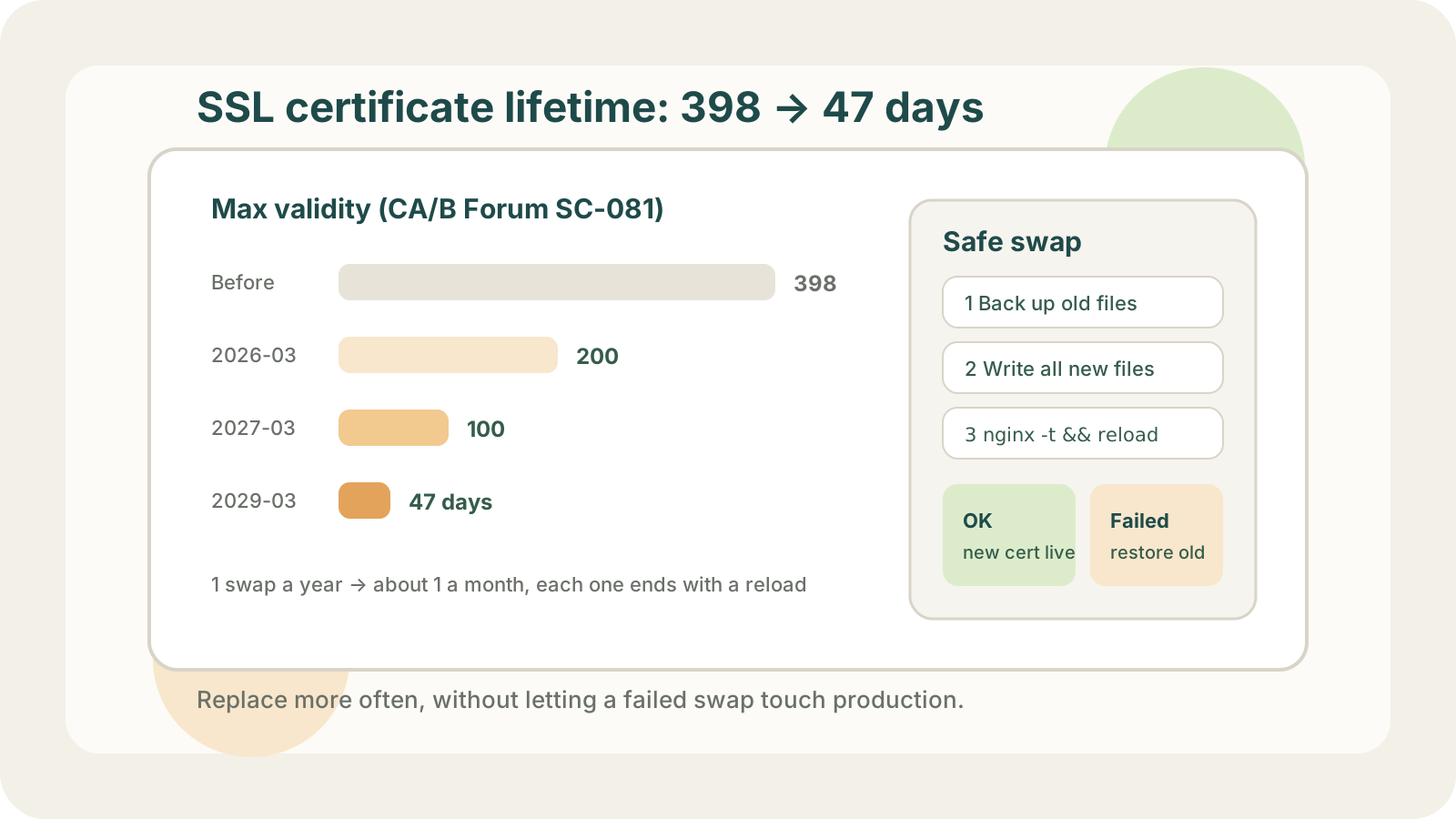
From March 15, 2029, a publicly trusted SSL certificate can be valid for at most 47 days. The step before that, 100 days, starts on March 15, 2027, and the first step is already behind us: certificates issued since March 15, 2026 are capped at 200 days.
A certificate you used to replace once a year will need replacing at least 4 times a year in 2027 and roughly every month in 2029. Every replacement ends with a reload, and a reload is exactly the operation most people running servers would rather not do often.
The schedule
The CA/Browser Forum adopted Ballot SC-081v3 in April 2025. Every publicly trusted CA has to follow it, so paid certificates are affected too:
| Effective | Max validity | Validation reuse |
|---|---|---|
| 2026-03-15 | 200 days | 200 days |
| 2027-03-15 | 100 days | 100 days |
| 2029-03-15 | 47 days | 10 days |
The third column gets less attention. Once a CA has validated that you control a domain, it can reuse that result for a while instead of validating again for the next certificate. By 2029 that window is 10 days, so almost every certificate will need fresh domain validation. If you still buy certificates and validate them by email or by uploading a file, you will be doing that every month.
When it was once a year, the problem was remembering
A yearly renewal is hard to schedule. Set a phone reminder for a year from now and there is a fair chance you will have a different phone by then. Calendars and ticket queues are not much better, since a year is long enough for the person who owned the task to move on.
If you relied on Let's Encrypt's expiry emails as a safety net, those stopped on June 4, 2025.
So expiry is often discovered by users. A pattern we ran into fairly often: customers on our mobile client reported a "network error" and nothing mentioned certificates. Native apps and embedded webviews often hide TLS failures behind a generic message like that. The server logs had no record of those requests at all, because the client gave up during the TLS handshake and never reached Nginx.
When a client reports network errors and your server logs show nothing, check the certificate first:
echo | openssl s_client -connect example.com:443 -servername example.com 2>/dev/null \
  | openssl x509 -noout -enddate
Or run the domain through the SSL certificate expiry checker without logging in to anything.
At 100 days, the problem is the reload
We used to run most certificates directly on cloud VMs and later moved many of them to a CDN. Swapping a certificate on a CDN is an upload. No SSH, no service restart.
On a server, the uncomfortable part is the reload, for two reasons:
- You are not sure whether someone changed the Nginx config since the last reload. A broken config sits there quietly until the next reload, and that reload happens to be the one you ran to swap a certificate.
- Some servers have not been touched in months. Reloading or restarting them out of the blue is the kind of thing that surfaces problems nobody knew about.
Once a year, you can live with that risk. At 100 days, every server faces it 4 or 5 times a year; at 47 days, every month. The CA/Browser Forum's reasoning is sound: revocation does not work well in practice, so a shorter lifetime limits how long a leaked key stays useful. For the people doing the swaps, it is still more work and more risk.
Why many admins still swap by hand
Plenty of people decide not to script it, and their reasons are specific:
- Servers and configs change over time. A script that was not updated along with them can do more damage than a manual swap.
- When you swap by hand, you know when it happened and you test it yourself afterwards. A script can fail at 3 a.m. when nobody is around to deal with it.
These concerns are fair. The tooling for issuance and renewal is mature: certbot and acme.sh renew on a schedule and can run a reload hook, Caddy handles certificates on its own, cert-manager renews them inside Kubernetes, and AWS Certificate Manager renews the certificates it issues for services like CloudFront and ALB. If everything you run fits one of these, you may not need anything else.
The gaps show up with a mix of servers and cloud services. certbot has no failure notifications, and acme.sh has notification hooks you have to configure yourself. Pushing a certificate to a CDN or load balancer outside those integrations usually means writing your own script against the provider's API, and that script is exactly the part that breaks when the environment changes.
Doing it by hand is a reasonable choice today. At 100 days the number of manual swaps stops being manageable, so automation has to win the same trust the manual process has.
The bar for automation: it can fail, but it must not touch production
The standard we hold automation to is a single rule: it can fail, but it must never take production down. Either the swap succeeds completely, or nothing changes.
A failed issuance or a failed deploy is fine. If certificates renew 30 days before expiry, a failure leaves weeks to fix it, and a failure at 3 a.m. is just a message to read in the morning. What is not fine is a half-finished swap that breaks the live service.
Services only reread certificate files on reload or restart. That means a deploy cannot hurt production as long as you do the following:
- Before replacing anything, confirm the new certificate and private key match.
- Back up the old files, then overwrite in place. Writing with
cat >keeps the file's owner, permissions, and symlinks; writing a temp file andmv-ing it over the original replaces all three. - Run
nginx -tbefore reloading. If the check fails, restore the old files and skip the reload. - Make sure a failure reaches a person.
If you swap certificates on your own servers, this script is a starting point:
#!/usr/bin/env bash
set -euo pipefail

CERT=/etc/nginx/ssl/example.com.pem
KEY=/etc/nginx/ssl/example.com.key
NEW_CERT=$1
NEW_KEY=$2

# The certificate and the key must share the same public key
if [ "$(openssl x509 -noout -pubkey -in "$NEW_CERT" | openssl sha256)" != \
     "$(openssl pkey -pubout -in "$NEW_KEY" | openssl sha256)" ]; then
  echo "Certificate and key do not match, nothing changed" >&2
  exit 1
fi

cp -a "$CERT" "$CERT.bak"
cp -a "$KEY" "$KEY.bak"

if cat "$NEW_CERT" > "$CERT" && cat "$NEW_KEY" > "$KEY" \
   && nginx -t && systemctl reload nginx; then
  echo "Replaced"
else
  cat "$CERT.bak" > "$CERT"
  cat "$KEY.bak" > "$KEY"
  echo "Replacement failed, old certificate restored" >&2
  exit 1
fi
The script exits non-zero on failure. Pair it with cron's MAILTO, or post to a Slack or Telegram webhook in the else branch, and someone will hear about it. For services that need a restart, such as Tomcat, restart again after restoring the old files, or the service stays down.
Managed services are simpler. On CloudFront, for example, the new certificate is imported into ACM first, and the distribution switches to it in a single update call. If that call fails, the distribution keeps serving the old certificate, so there is no half-swapped state.
If you would rather not maintain the script
You can hand it to LapseZero. It issues certificates from free CAs such as Let's Encrypt, renews them before they expire, and deploys them to your servers or to AWS, Alibaba Cloud, and Tencent Cloud services such as CDNs and load balancers.
On servers, it does roughly what the script above does: back up the existing files, write everything before running the post-deploy command, and restore the old files if a write fails. If the post-deploy command fails, it restores the files and runs the command once more to bring the service back on the old certificate, then tells you "rolled back, the old certificate is still live" and waits for you to check the cause before retrying. Including nginx -t in the post-deploy command is recommended here as well.